Step-by-step guide to change your Freshdesk Password
1. Login to your Freshdesk account on the Freshdesk Web portal or App.
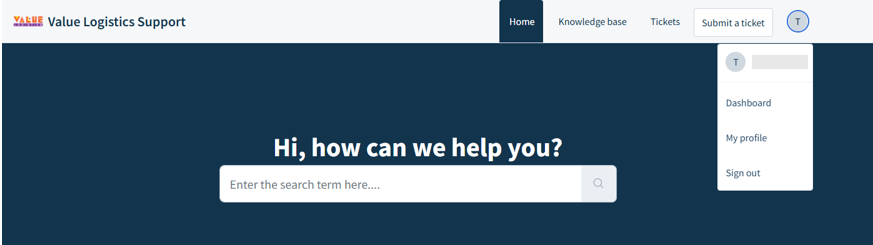
2. Once you have logged in, click on your profile icon on the top right of the page.
>Click "My profile"
3. You will be redirected to "My Profile Settings"
>Click "Change your profile info or password" under your Profile Details
4. Click "Security"
>Then click "Change password"

5. Enter your details in their respective boxes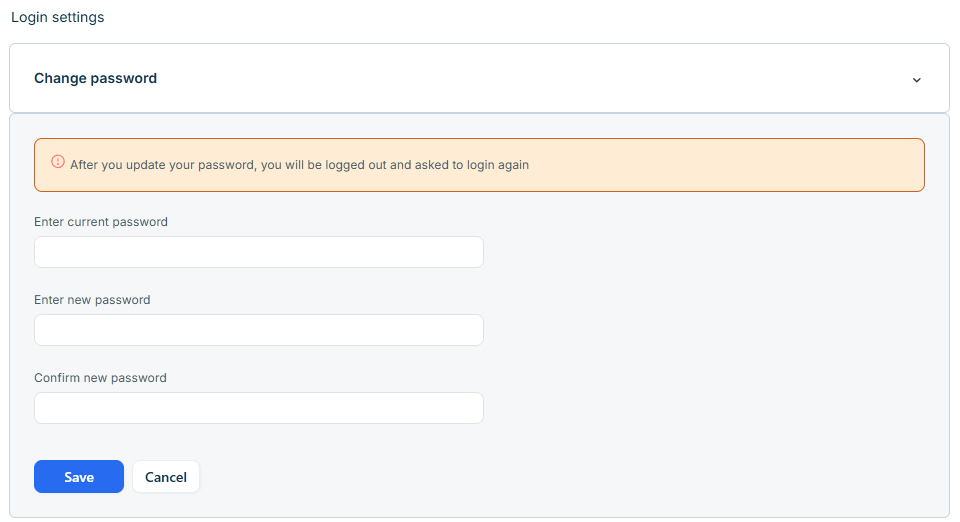
If you require assistance, please submit a ticket and the IT Support Team will contact you :)
Was this article helpful?
That’s Great!
Thank you for your feedback
Sorry! We couldn't be helpful
Thank you for your feedback
Feedback sent
We appreciate your effort and will try to fix the article